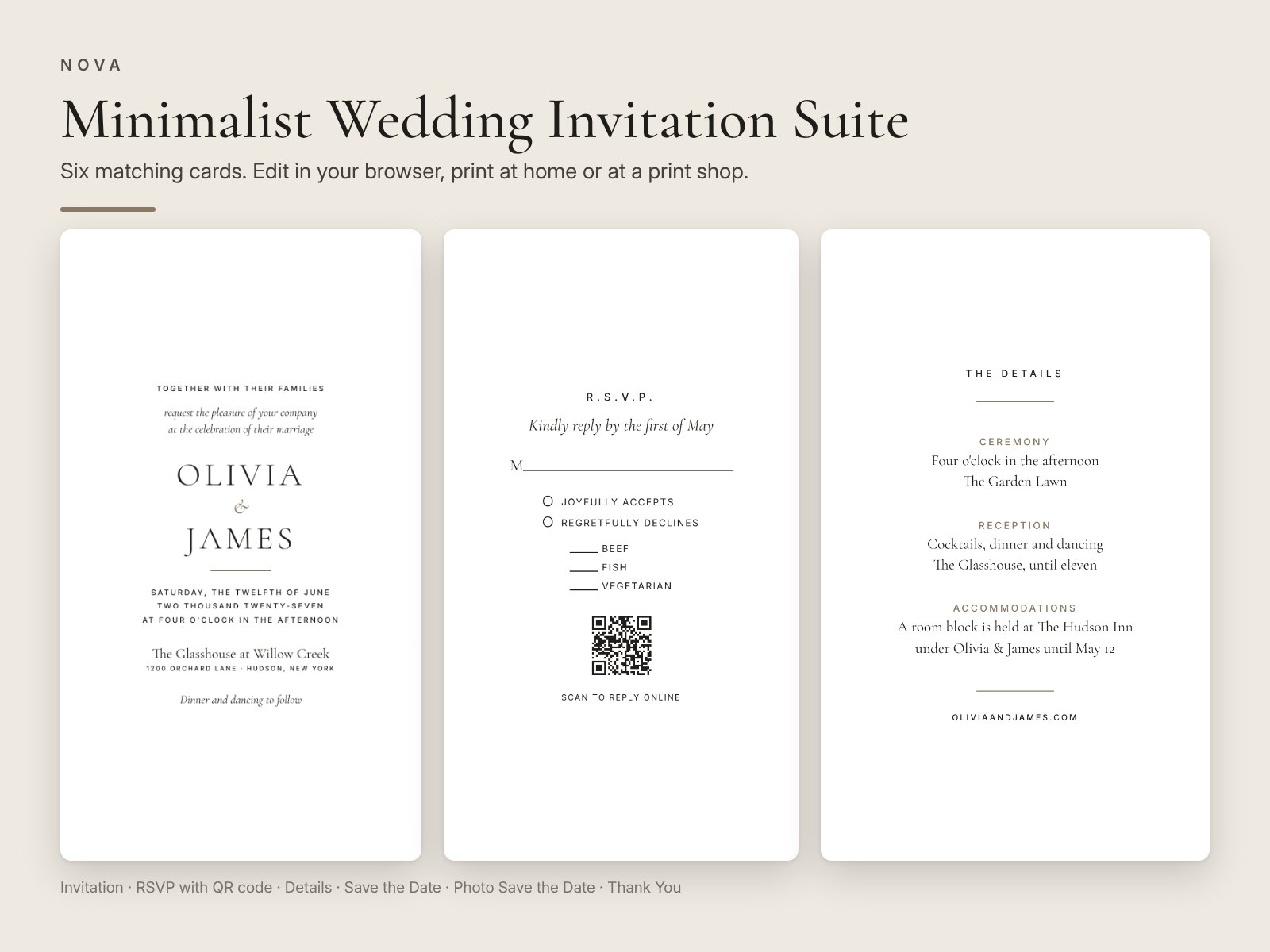
About this template
A quiet, modern wedding suite: Invitation (5 × 7 in), RSVP (3.5 × 5 in), Details (4.25 × 5.5 in), Save the Date (5 × 7 in), Photo Save the Date (5 × 7 in, with your own photo) and Thank You (4.25 × 5.5 in).
Paste the link to your wedding website or RSVP form and the studio adds a QR code to the RSVP card (and the Details card if you like), made on your computer. NOVA scan-tested the code from screen and from a 300 dpi print.
Edit everything in the NOVA Invitation Studio, a single file that opens in your web browser. No account, no app to install and no internet connection needed; the fonts are built in and your text never leaves your computer. Choose Ivory & Ink, Sage, Terracotta or Midnight, classic or script names, with or without a fine border. Long names shrink to fit automatically.
Prefer drag-and-drop? The download also includes Canva template links for all six cards (a free Canva account is enough). The Canva version uses only free fonts and no Canva Pro elements.
Print at home on US Letter or A4 with crop marks, or send print-shop files with 0.125 in bleed. A scale test page and a clear English guide help you get accurate prints the first time.
Features
- 6 cards: Invitation, RSVP, Details, Save the Date, Photo Save the Date, Thank You
- QR code RSVP from any link (wedding website, Zola, The Knot, Google Forms)
- Add your own photo to the photo save the date, choose the crop
- Edit all text in your browser, offline, no account
- Also editable in Canva: template links for all 6 cards (free Canva account)
- 4 colour themes, classic or script names, optional border
- Long names and addresses shrink to fit the safe area
- Home printing: US Letter or A4 sheets with crop marks
- Print shop: one card per page with 0.125 in bleed
- Exact-size PDFs for online printers and sharing by email
- Scale test page to catch printer scaling
- Fonts embedded in every PDF (SIL Open Font License)
- Save and reload your text as a file
What's included
- NOVA Invitation Studio (.html)
- Canva template links for all 6 cards (PDF with 3 links)
- Example PDFs: US Letter, A4, print-shop bleed, exact size
- Edit & print guide (PDF, English)
- License and font licenses
Details
| Format | HTML editor, Canva template, PDF |
|---|---|
| Works with | Google Chrome desktop (tested), Microsoft Edge (same engine, not separately tested), Canva, free account |
| Delivery | Instant digital download |
| License | Personal use for one wedding or event. Print as many copies as you need. No resale. |
| Product code | NV008 |
| Version | 1.2.0 |
| Last updated | 2026-11-29 |
Questions
Is this a Canva template?
Both. You get the NOVA Invitation Studio, which works offline with no account, and Canva template links for all six cards. A free Canva account is enough; no Pro elements are used. In Canva you add your photo and your RSVP QR code yourself (Apps › QR code).
Which browser should I use?
Google Chrome on a computer (tested). Edge uses the same engine. Printing from Firefox and Safari has not been tested.
Can I change the layout or add photos?
In the studio you can change all text, colour theme, name style and border, and add your own photo to the photo save the date; elements stay in place. For free layout changes use the Canva version.
Does the QR code work?
Yes. It is a standard QR code made on your computer from the link you paste. NOVA scan-tested it from screen and from a 300 dpi print. Always scan one printed card before printing them all.
Is anything shipped?
No. This is a digital download; you print it yourself or at a print shop.
How do I get my file after buying?
Checkout is handled by Gumroad. Right after payment you get a download link on screen and by email. You can re-download any time from the Gumroad receipt or library.
Do the spreadsheets work in Excel and Google Sheets?
Each product page lists the exact apps and versions it has been tested in. We only list an app after we have tested the file in it.
Is it a subscription?
No. Every product is a one-time purchase. Updates to the version you bought are free.